National 5 Computing Science
Testing: test data and test tables
National 5 Computing Science: Software design and development, Web design and development
Testing checks that a program does what it should. In National 5 Computing Science you choose test data, predict the expected output, and explain what a result shows. Choosing the data is usually done well. Explaining why, and working out the expected output properly, is where marks go.
Three kinds of test data
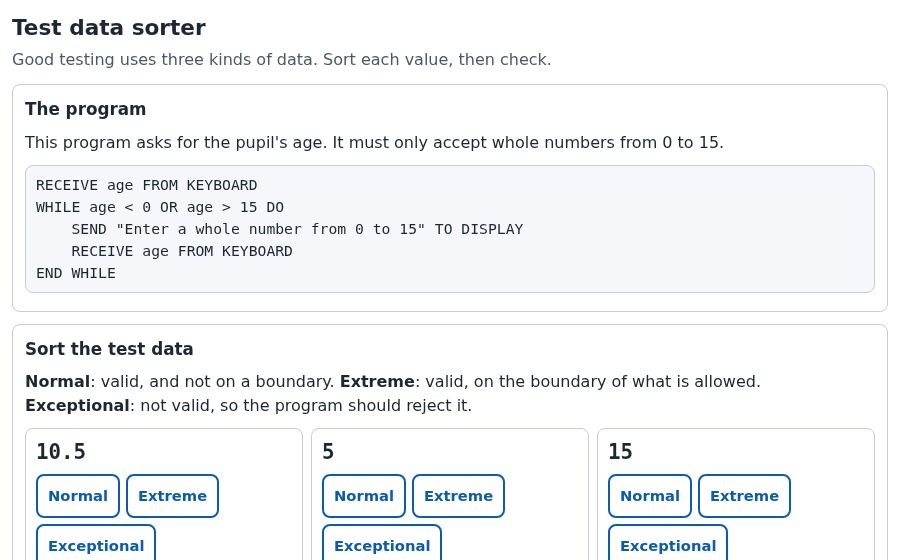
Take a program that accepts a shoe size from 3 to 13 inclusive.
| Kind | Meaning | Examples |
|---|---|---|
| Normal | Valid data inside the range | 5, 8, 11 |
| Extreme | Valid data on the limits of the range | 3 and 13 |
| Exceptional | Data that should be rejected: outside the range or the wrong type | 2, 14, 8.5, "ten" |
Extreme data is valid: 3 and 13 should both be accepted. That catches the most common bug, a wrong operator such as < where <= was needed.
- "3 and 13 are extreme data, on the limits of the range. They check that the boundaries are accepted, for example that <= has been used and not <."
- "To check the program rejects them." Extreme data is valid, so it should be accepted.
- "Extreme data is very big numbers." Extreme means the limits of the range, whatever they are.
Test tables
A test table lists each test, the expected output and the actual output. Here "Rejected" means the program displayed its error message and asked again.
| Test data | Kind | Expected | Actual |
|---|---|---|---|
| 8 | Normal | Accepted | Accepted |
| 13 | Extreme | Accepted | Rejected |
| 14 | Exceptional | Rejected | Rejected |
The second row shows a problem: 13 should be accepted but was rejected. That is a logic error, probably size < 13 where size <= 13 was needed. The program runs, but gives the wrong result.
- Work out the expected output yourself, by hand, before running the program. The examiners noticed candidates copying the program's own output as the expected result. If the program is wrong, the test then "passes" and the error is never found.
- When a question asks for another test, choose one that is not already in the question. Repeating a given test does not gain the mark.
Testing a website
In web design and development the same idea applies: compare what you see with what was planned. Check that each page matches its wireframe, that every link goes to the right page, that images, audio and video display or play, and that the pages are consistent with each other.
When a test fails, the developer goes back to fix it: see iterative development. For validation, the algorithm most often tested with extreme data, see input validation.
Try two exam-style questions
Choose an answer, say how sure you are, then press Check. Every wrong answer tells you why it is wrong.
The full course covers every topic like this. Every topic in National 5 Computing Science has a short note, a simulation to try and a practice quiz with feedback on every answer, plus coding lessons, a full mock exam and a progress report for parents.
More guides
- Input validation: how to get all 4 marks
- Running total within a loop
- round, random and length: writing the whole call
- Choosing the most suitable data type
- Evaluating a program: answers that gain the mark
- End-user and functional requirements
- CSS classes and external style sheets
- Absolute and relative addresses
- Making a sound file smaller
- Concatenation: joining strings for the mark
- Iterative development: describing going back
- All the free revision guides
This site is independent: it is not connected to the SQA or Qualifications Scotland. Points from the examiners' course reports are given in our own words.